Category: How To

How to install Google Chrome Browser on Kali Linux
Google Chrome is one of the most popular web browsers and is available across many different devices. It can also run on Kali Linux, although Mozilla Firefox is the default web browser and comes preinstalled with the distro. Installing Google Chrome on Kali is pretty easy, but not as straightforward as you…
Explore More
How to Connect to McDonald’s WiFi
If you love the new McCafé, you’ll be glad to hear that McDonald’s offers free WiFi at most of their locations. In fact, participating locations have faster WiFi than most public WiFi services. With download speeds of 58 Mbps and upload speeds of 14 Mbps, you can actually stream movies…
Explore More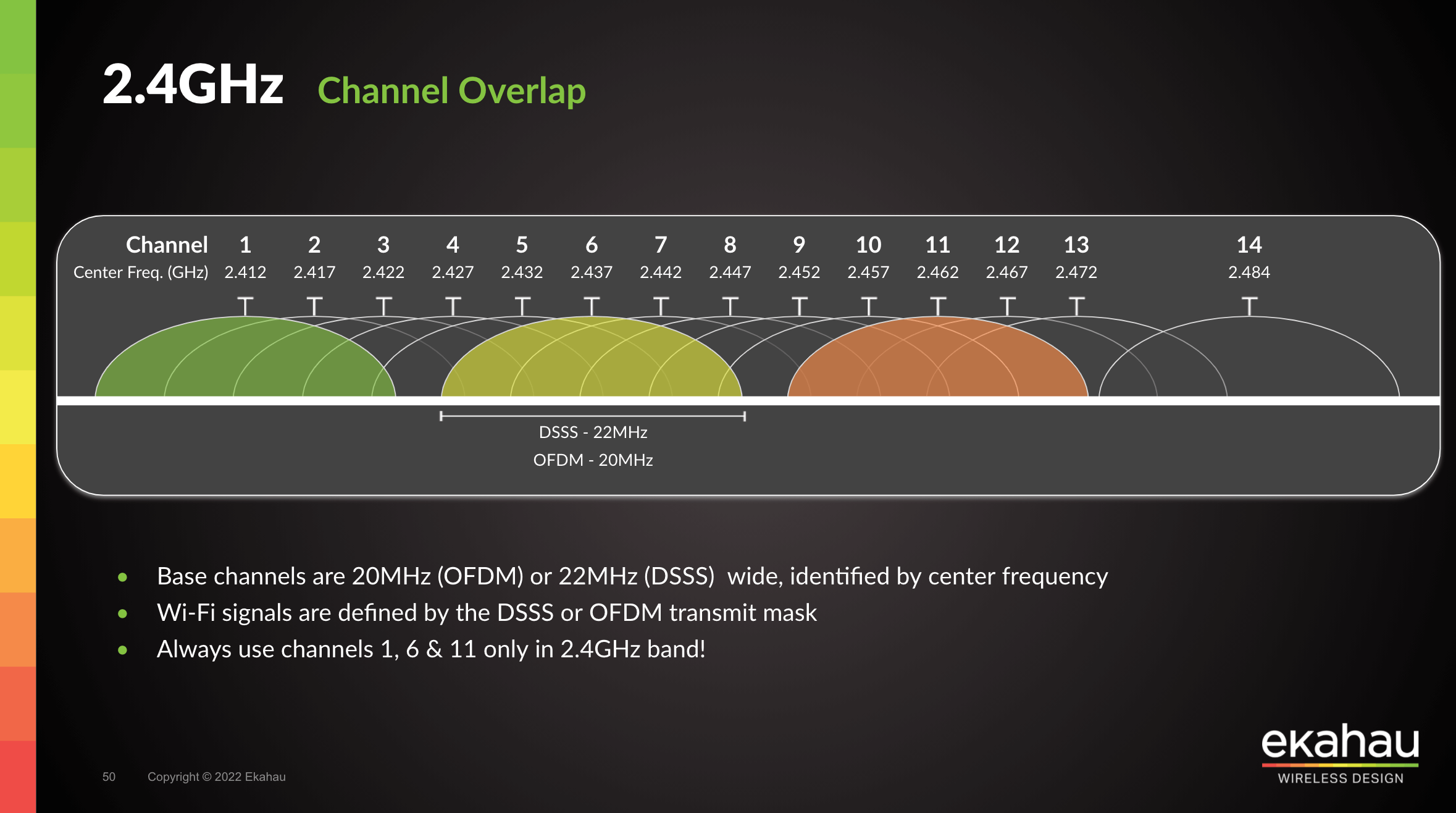
How to Change Your WiFi Channel on a Router
If you live in a crowded area, you might have noticed times when your WiFi suddenly slows down or drops off out of nowhere. These performance issues can happen when too many of your neighbors are connecting to the same WiFi channel, which can interfere with your WiFi signal. Here’s…
Explore More
How to Change Your Spectrum WiFi Name and Password
When you get a new router from Spectrum, the first thing you should do is change the default WiFi network name and password. This will make it easier for you to remember your WiFi password. And it will also make it more difficult for hackers to breach your network and…
Explore More
How to Add a Signature in Gmail
Not only does a custom signature give your communications more pizzazz, but it also helps your contacts know where to reach you, and where they can get more information about your business. And since Gmail is the most popular web client, it pays to know how to tweak its settings. Here’s…
Explore More
How to Find Your WiFi Password on a Windows 10 PC
After you log into a WiFi network once, your Windows 10 computer can remember the password and automatically log in for you. So, it’s no wonder that many of us forget WiFi passwords over time. Here’s how to find the WiFi password for any network you have joined on your…
Explore More